Understanding Redis Persistence
When people hear about Redis, they often think of it as a fast, in-memory database. That’s true! Redis stores everything in RAM, which makes it blazing fast. But here’s the catch: what happens if Redis crashes or your server reboots?
👉 Without persistence, all data is gone.
This is where Redis persistence comes into play. Let’s dive in step by step.
1. What is Persistence in General?
Persistence means data outlives the process that created it.
- Non-persistent data: Lives only in RAM, gone when the program stops.
- Persistent data: Saved somewhere permanent (disk, database, cloud).
Redis gives us mechanisms to make data persistent, even though it lives in memory.
2. Redis Persistence Options
Redis supports three main modes:
2.1 RDB (Redis Database File – Snapshotting)
- Saves the dataset into a binary file (
dump.rdb) at specific intervals. -
Configured with
saverules inredis.conf, for example:save 900 1 # Save if 1 key changed in 900s save 300 10 # Save if 10 keys changed in 300s save 60 10000 # Save if 10k keys changed in 60s - Pros: Small files, faster restarts.
- Cons: Risk of losing recent data if Redis crashes between snapshots.
2.2 AOF (Append Only File – Write Ahead Log)
- Logs every write command in a file (
appendonly.aof). - On restart, Redis replays the file to restore the dataset.
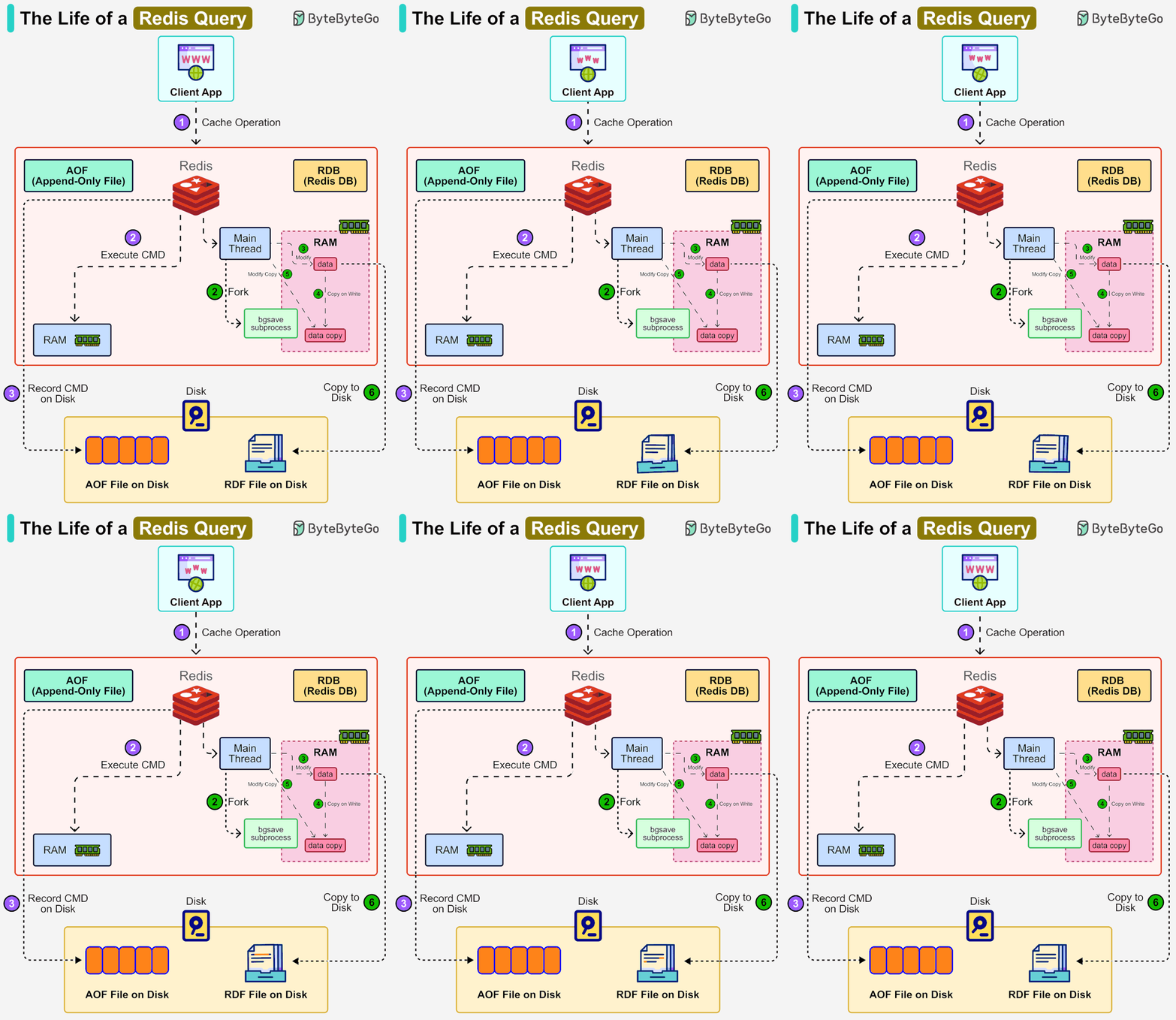
How It Works
- Command executed in memory.
- Command appended to an in-memory AOF buffer.
- Buffer is flushed to disk depending on
appendfsyncpolicy.
appendfsync Policies
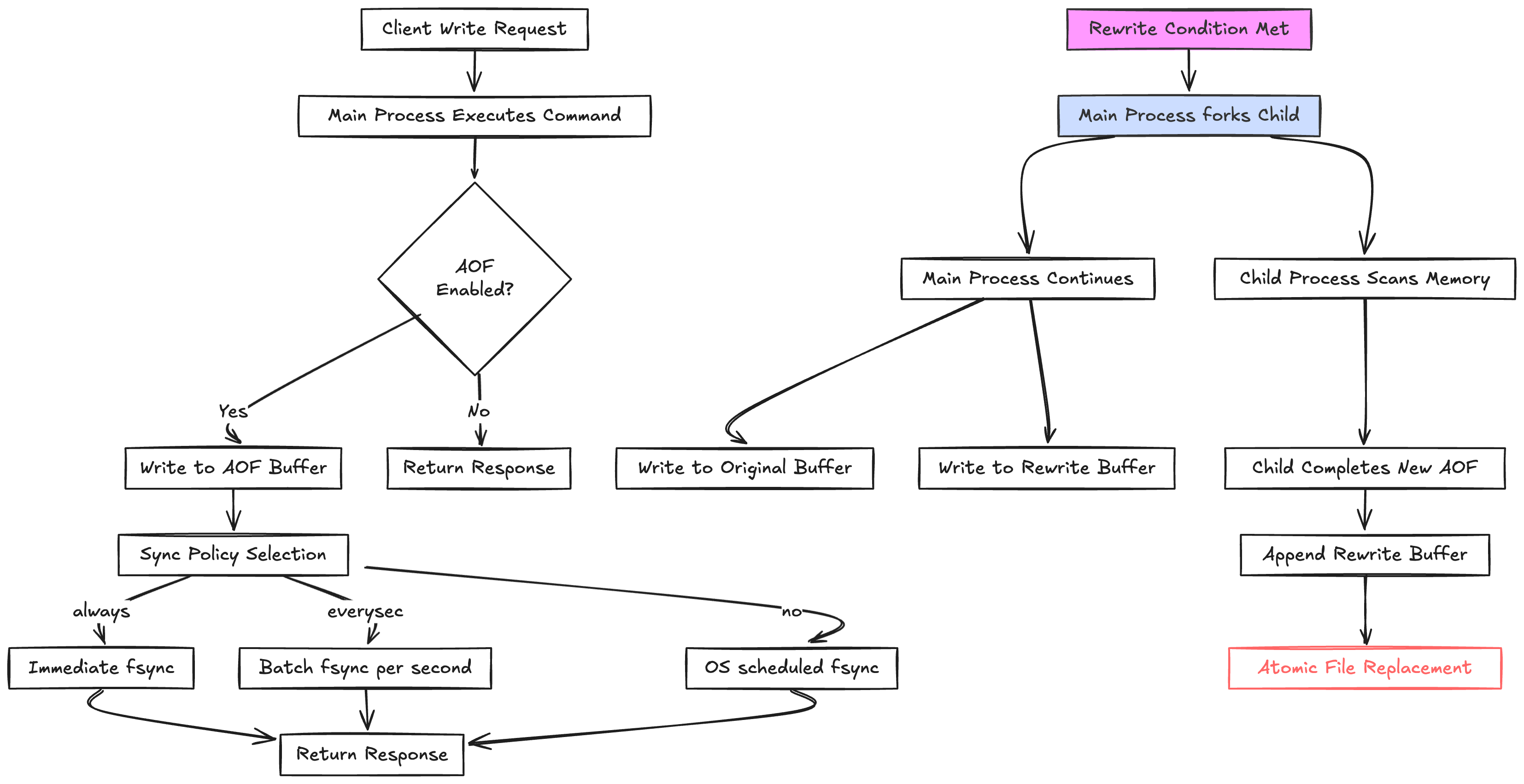
appendfsync always→ flush to disk immediately (safest, but slowest).appendfsync everysec→ flush once per second (default, good trade-off).appendfsync no→ let the OS decide (fastest, but least safe).
👉 Default is everysec –> which means you can lose at most 1 second of data.
Pros and Cons
- Pros: More durable than RDB.
- Cons: File can grow large, restarts are slower.
2.3 Hybrid (RDB + AOF)
- Since Redis 4.0, you can combine RDB + AOF.
- You get fast restarts (RDB) + minimal data loss (AOF).
- Often used in production for balance.
3. AOF Rewrite (Compaction)
Over time, the AOF file can become huge, because it logs every command. Example:
SET counter 1
SET counter 2
SET counter 3
AOF stores all 3 lines, but only the last one matters.
Redis solves this with BGREWRITEAOF:
- Forks a background process.
- Child rewrites a new AOF file by reading and compacting the old AOF on disk.
- Merges any new commands from the buffer.
Result → a smaller, optimized AOF file.
4. Choosing the Right Mode
- Pure cache? Disable persistence (fastest).
- Durability matters? Use AOF with
everysec. - Balanced approach? Use both RDB + AOF.
5. Analogy
Think of Redis persistence like keeping a diary:
always: Write down every word you say immediately (slow, safest).everysec: Speak freely, jot down things once per second (balanced).no: Rely on memory, write whenever you feel like it (fast, risky).
6. Managing AOF File Growth in Redis
Redis uses the Append-Only File (AOF) persistence mechanism to log every write operation. This ensures durability, but over time the AOF file can grow very large. If left unmanaged, this causes:
- Longer restart times (Redis must replay more commands).
- Wasted disk space.
- Higher I/O overhead during persistence.
So how does Redis handle this?
6.1. AOF Rewrite (Compaction)
Redis prevents infinite file growth with a process called AOF rewrite (triggered via BGREWRITEAOF).
- Redis forks a background child process.
- The child reads the old AOF file on disk and rewrites a compact version, removing redundant commands.
- Meanwhile, the parent accumulates new writes in an in-memory buffer and continues writing them to the old AOF file for durability.
- Once the child finishes the new file, the parent appends the buffered commands to it.
- Finally, Redis atomically renames the new file to replace the old AOF.
✅ Key points:
- The old file is not read or modified during the rewrite — the child builds a fresh compact file.
- The buffer ensures no writes during rewrite are lost.
- Atomic rename ensures there is no moment when the AOF is missing or corrupted.
6.2. Auto-Rewrite Policies
Redis can automatically trigger AOF rewrite when the file grows too much. Configurations in redis.conf:
auto-aof-rewrite-percentage 100
auto-aof-rewrite-min-size 64mb
This means:
- If the AOF file size has doubled (100% growth) and is at least 64MB, a rewrite is triggered.
Engineers can tune these thresholds depending on workload.
6.3. Operational Practices
To keep AOF manageable, engineers often:
- Monitor disk usage and set alerts for unexpected growth.
- Tune rewrite thresholds for balance between performance and space.
- Use SSDs for faster AOF writes.
- Combine AOF with RDB snapshots — RDB for backups, AOF (
everysec) for durability.
6.4. Extreme Cases
When the AOF grows extremely large (hundreds of GBs):
- Restart times become slow, since Redis must replay the file.
- Engineers may temporarily switch to RDB-only, rewrite/trim the AOF, then re-enable it.
- In some cases, data is migrated (dump + restore) to reset file size.
7. Key Takeaways
- Redis is in-memory, so persistence is optional.
- RDB = snapshots → faster restarts, possible data loss.
- AOF = command log → safer, bigger file, slower restart.
- Hybrid = best of both worlds.
appendfsyncdecides when data is flushed from buffer → disk.- AOF rewrite prevents unbounded file growth (Redis prevents endless AOF growth with background rewrite (compaction) and auto-rewrite policies. Engineers fine-tune settings, monitor growth, and use RDB+AOF together to balance durability, performance, and storage efficiency.)